
Vulnerabilities
Vulnerabilities can be added to Information Security (Abriska 27001) and Business Continuity (Abriska 22301) risk assessments for further context and risk consideration.
Conducting a Business Continuity Risk Assessment requires individual vulnerabilities that might increase the organisation’s exposure to certain threats, to be identified.
A vulnerability is defined as:
“A weakness in a resource or group of resources that can be exploited by one or more threats.”
Vulnerabilities can be included with the Information Security Assessment also. To add vulnerabilities to either assessment is as follows;
Adding vulnerabilities
Vulnerabilities are added at an BC Assessment or IS Assessment level. To manage vulnerabilities, select "Identify Vulnerabilities" from the assessment workflow.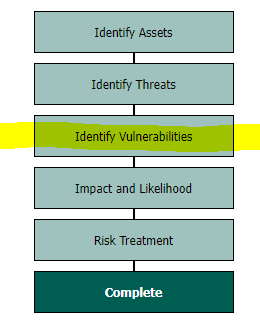
Vulnerabilities can only be modified when the vulnerability assessment is unlocked. To do this, click “Modify the Vulnerability Assessment” in the sidebar. Additional vulnerabilities can now be added by clicking the “Add vulnerability” link. Vulnerabilities can also be added from the Abriska “Vulnerability Library” which contains template examples of vulnerabilities.
For information security, these vulnerabilities should be seen as an 'exception to the rule',rule'. for
example,Example if1. If the organisation generally has a good approach to backups but has one legacy system that can’t be backed up, rather than downgrading the control maturity for Control 8.13 Information backup, a vulnerability against just the legacy system (asset) can be raised.
OnceExample all2. An organisation uses ipads/tablets, however the QA team uses them to test new versions of the mobile app, as they are used differently, they can be listed as a vulnerability.
Abriska is set up with a library of various vulnerabilities havethat beenmay added,apply to progressan ontoorganisation. thePlease nextcheck stagethis oflibrary thebefore riskcreating assessment,a clicknew “Complete Vulnerability Assessment”.vulnerability.
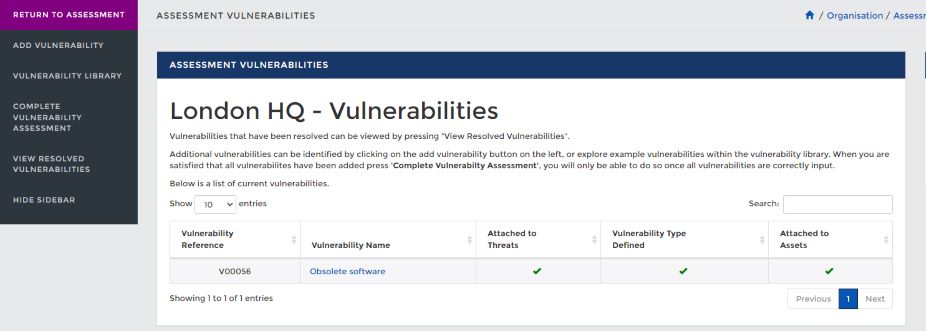
When initially adding a vulnerability, only the name and description fields are required. The reference will be automatically generated by Abriska depending on the next available reference number. Once a vulnerability is added, it needs to be classified in terms of vulnerability type, what resources/asset it is linked to, and which threats it affects. Vulnerability types are explained below, see Conducting a Business Continuity Risk Assessment for an explanation of how to link vulnerabilities with resources and threats.
Vulnerability Types
Each vulnerability could affect an organisation’s resources in a different way. It could be a combination of the factors described below.
- Increase likelihood -The resources that are affected by this vulnerability are more likely to be affected by the threats that this vulnerability is linked to. For example, if an organisation’s HQ is located on a flood plain then there is a higher chance of flooding.
- Increase impact - Due to this vulnerability, the impact on the organisation would be greater. For example, if a single point of knowledge exists within a worker, there would be an increase impact of the threat loss of key staff.
- Increase duration - Due to this vulnerability, the time to recover the related resources after an incident is increased. For example, if specialised/unique equipment is used within a process then if this fails there will be added increased time to recover.
Types are entered against each vulnerability under the “Types” tab.
Once all of the vulnerabilities have been added, to progress onto the next stage of the risk assessment, click “Complete Vulnerability Assessment”.
Risk Register
Vulnerabilities will show within the risk register against a risk. Depending on the impac of the vulnerability and overall risk score, the vulnerability may be mentioned in the risk statement, indicating it is having a signification impact or will be listed within the risk components tab if deemed lower impact to the risk overall.Risk Treatment
The risk treatment option within the risk assessment setup (under risk reporting)Vulnerabilities require a risk treatment decision and actions.
Back to Process Overview