
Managing and Audit Programme
Establishing the extent of the audit programme
Following the setup of the audit module, including workflows, finding types and test scripts, 'activities' or processes need to created to base the audits on.Processes
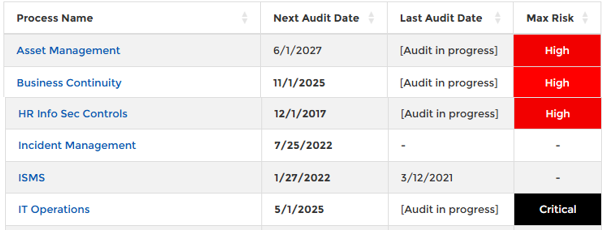
ISO 19011:2018 definition: 'process', ' a set of interrelated or interacting activities that use inputs to deliver an intended result'. The audit scope should generally include a description of activities and process as well as the time period covered and virtual or physical locations.The scope of an audit programme may be shown in the Process Overview, which provides a high level picture of all the processes included within the programme. As well as providing details of the next audit that is scheduled for the process, it provides the status of any audits that are in progress. A number of markers, highlight any processes which have audits scheduled within the next 4 weeks or already reached their due date, but have not yet started.
New Process
A process may be created to define a topic or area within the business, which helps with the planning of an audit programme. When defining a programme and determining is scope consideration might be given to:
- The organisational structure, possibly listing regions, divisions, department or teams.
- The organisational locations, sites, buildings, floors or segregated areas
- The products and services provided
- The business operational processes, such as marketing, sales, design and development, production, support
- The support functions and process, such management of IT, HR, Buildings
Once a process is created, it is displayed in the Process Overview
Process Overview
Each process may be edited by double clicking on the individual process, which allows all controls and clauses that apply to the process to be identified.
Addign Clauses
When planning a programme, it is important to identify all the compliance requirements that may apply. These requirements can be identified for each process, enabling future audits to be planned, based on the compliance requirements defined at process level.All the clauses previously set up – in the AAM Setup, may be selected for each process.
Any number of clauses may be identified and assigned to a process. By selecting the ‘Add Clauses’ menu and selecting the drop down boxes provided it is possible to select a clause, by pressing (green + symbol). For efficiency, it is possible to select a complete set of clauses from one ‘Control Group’, a group of nested clauses, or an individual clause.
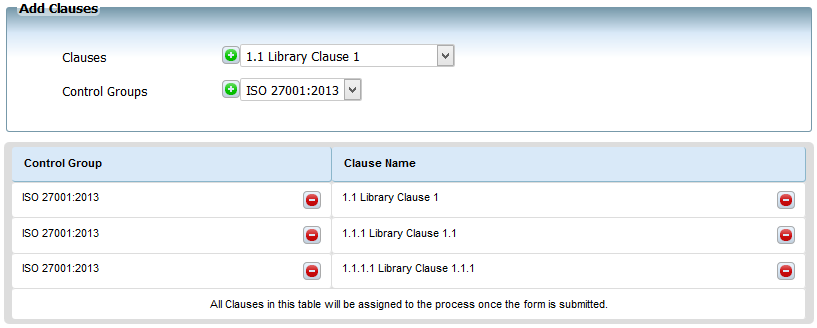
A list of all the clauses selected is provided for review, within this display it possible to remove clauses. Again clauses may be deleted at for a ‘Control Group’, nested group or individually.
Once all the required clauses are selected the submit option must be taken to assign the clauses to the process.
Note:@@Note: it is possible to add and remove clauses until an assigned audit starts.
starts.@@
Add Controls
When planning a programme, it is important to identify all the compliance requirement that apply. These requirements can be identified for each process, enabling future audits to be planned, based on the compliance requirements defined at process level.All the controls previously set up – in the CMA Setup may be selected for each process.
Any number of controls may be identified and linked to a process. By selecting the ‘Add Controls’ menu and selecting the drop down boxes provided it is possible to select a control, by pressing (green symbol). For efficiency, it is possible to select a complete set of controls from one ‘Control Group’, a group of nested controls, or an individual controls.
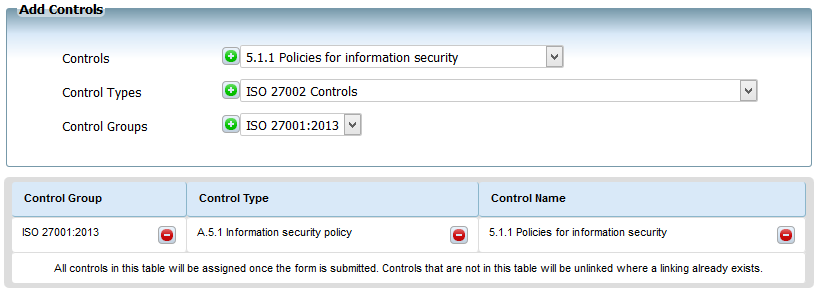
A list of all the controls selected is provided for review, within this display it possible to remove controls. Again controls may be deleted at for a control group, nested group or individually.
Once all the required controls are selected the submit option must be taken to assign the clauses to the process.
Note: it is possible to add and remove clauses until an assigned audit starts.
Add an Audit
Once a process is defined, and the clauses and controls that describe compliance requirements are assigned to the process, an audit may be set up for that process by selecting the ‘Add an Audit’ from the menu bar.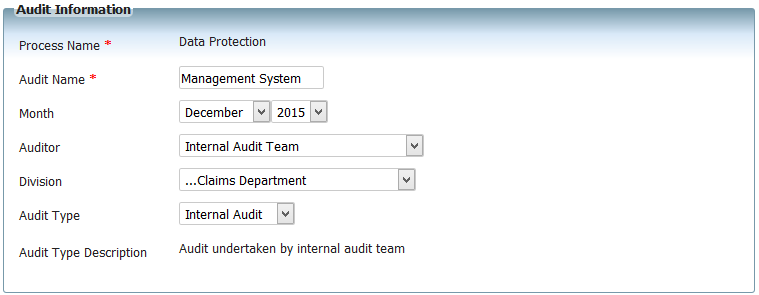
Initially some basic information to describe the scope of the audit needs to be decided. As well as planning the initial audit start date and finish date, it is possible to plan multiple audits, based on the same scope. It is possible to identify the number of audits that take place and the time interval between each audit.
An individual contact or team, may be assigned as the auditor to each audit.
Whilst planning the scope of the audit individual divisions may also be considered along with the type of audit that will take place.
Once the basic details are finally submitted the audit along with any future scheduled repeated audits are assigned to the process, and displayed in the planned audit tab. Each individual audit may be edited at future date to reassign.
Archive a Process
Processes may be archived at any time, the request to archive the process will hide the process from view, but will not remove the data.
Back to Audit and Action Tracking