
SRM Setup
Supplier Risk Management setup
General Configuration
From the main SRM setup page, you can complete some basic settings:Complete Questionnaire Limit
Allow Partially Completed Questionnaires -
Supplier Registration Time - the amount of time the registration link will be live before expiring. The time frame excludes weekends.
Controls
One of the advantages of Abriska is that questions relate directly toA default set of controls
To view the questions, select > SRM Setup > controls > 'named control'. On the sidebar menu, an option is made available 'View Questions'.
More information is available in the controls section regarding adding
Categories
Probably one of the most important components of Abriska. Categories provide the opportunity to tailor the questionnaire based on the nature of the commodity or service provided by the supplier. If there were only oneReducing the number of questions received by a supplier
In the first instance, consider the categories that have been set up. Could additional categories be created to refine control questions? Can control questions be branched further to ensureView the videos page that can guide you through this process or go back to SRM Setup.
Improving questionnaire completion rates
URM is happy to advise and support. In essence, completion rates are enhanced by ensuring that relevant questions are sent to the supplier only. This is where the application of ‘Categories’ can help refine the overall question set in line with the risk presented by the supplier in the context of the service or commodity supplied.Risk Rating
To understand whether the responses to the questionnaire are leading to an acceptable or unacceptable level of risk, you can assign a risk rating through the setting of risk appetite thresholds.A high-risk commodity or service being provided by the supplier could have a different set of tolerance levels than a low risk supplier. For a high-risk supplier, you may require a score of 100% on the allocated questions, whereas for a low risk supplier you may tolerate a much lower level of compliance.
The table expresses residual risk based on the responses to the questionnaire and subsequent evaluation by subject matter experts. It is completely configurable.
Example: For a high-risk supplier with an attribute score of ‘3’, only a questionnaire score of 90% or more would be negligible residual risk, whereas a score of 0% would be high risk.
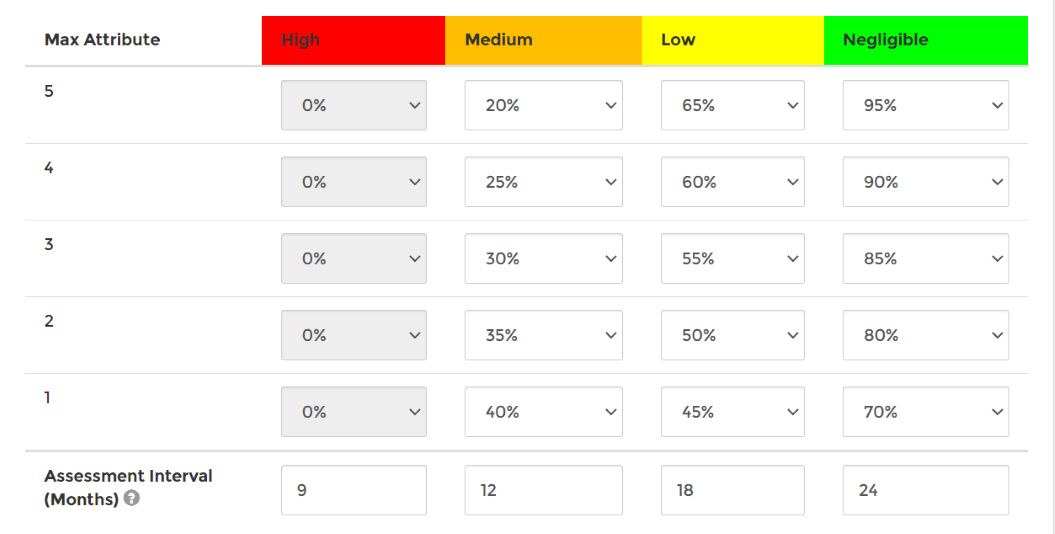
Risk Rating boundaries and assessment intervals
The assessment intervals are an optional feature to utilise. It will enable to keep a closer eye on your more high risk suppliers. The intervals are segregated into the number of months after which you would plan to reassess the supplier when they are related at the given risk level.
Filter Questions
Filter Questions are designed to provide a further breakdown of controls and their questions. A filter question can be used to remove a whole section of control questions, based on their yes/no answer. These questions carry no weight on the overall survey of the supplier.Creating filter questions From SRM setup > Filter Questions > create the question e.g. 'Are all assets kept on site? (all assets including laptops are kept within one secure site).' This question could be linked to control 7.9:Security of assets off-premises, if answered 'Yes', then the controls questions will not be asked, if the question is answered as 'No' then the questions will be asked as part of the questionnaire.
Information Questions
Information questions allow you to ask supplier for additional detail that does not need to be scored. These questions are linked to categories to allow you to ask category-specific information questions.For general information questions e.g. company address, contact details etc we recommend creating a specific category first > then go into the information questions > create your questions and then assign to said category.
For information questions you want to be part of existing categories > create an info question and then assign to the category.
Supplier Communications
There are three default emails configured with Abriska, all can be customised within the interface:- The first is to be sent to the supplier to enable them to register on the system.
- The second provides the introduction to the questionnaire
- The third is a reminder email to the assigned contact at the supplier.
Back to Supplier Risk Management